
Introduction
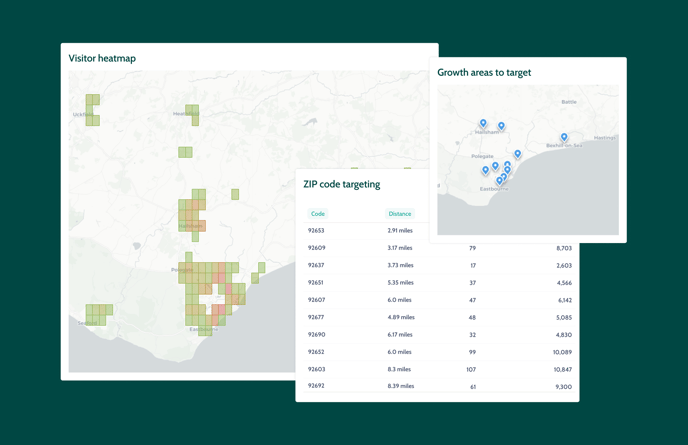
The visitor heatmap and postcode/zipcode targeting tools give you clear, visual insights into your visitor demographics, helping you make data-driven decisions about marketing spend and campaigns.
It’s designed for visitor attractions that want to make smarter marketing decisions using real visitor data. You’ll see where demand is strongest, how far people are travelling to visit you, and which local areas have untapped potential for ads, promotions, or partnerships.
Note: This feature is only available through the Marketing Suite.
To get started, go to Community → Geographic targeting. Both the visitor heatmap and postcode/zip code targeting tools are located here.
See where your visitors are coming from
🗺️ Visitor heatmap
The heatmap uses a colour scale to show the geographic concentration of your visitors:
-
Red: High visitor density
-
Green: Moderate visitor density
-
Blank areas: Few or no visitors
This is based on latitude and longitude data taken from billing postcodes at checkout.
Adjust your zoom level:
-
Local (e.g. SW13): Broader trends (5–10 mile radius)
-
Hyperlocal (e.g. SW13 1): Detailed trends (0.5–1 mile radius)
Changing the zoom updates the map instantly and adjusts postcode/zipcode suggestions below accordingly.
You’ll also see key metrics like:
-
Percentage of visitors within certain distances (e.g. 50% within 4.3 miles)
These insights help define your true local catchment area.
Know where to focus next
📍Postcode/zip code targeting
Below the heatmap, you'll find recommended postcode areas. These are automatically calculated based on your average visitor travel distance, combined with population and census data.
Note: This data may take 10–15 seconds to fully load due to its complexity.
Filter by audience segment:
-
Young families
-
Families
-
Teens
-
Adults
-
Grandparents
Tip: Selecting an audience updates postcode suggestions to highlight areas with the most relevant demographics.
Each postcode includes:
-
Total visitors from that area
-
Estimated local population of your selected segment
-
Performance rating showing your market penetration
Postcodes are grouped into actionable segments:
| Segment | What it means | How to use it |
|---|---|---|
| Core 📌 | Areas you’re already converting well | Focus on loyalty, repeat visits, upsells, and referrals |
| Growth 📈 | High-potential areas you currently under-reach | Run targeted paid ads and local promotions |
| Emerging 🌤️ | Low volume but nearby and promising areas | Test light marketing, especially for seasonal events |
Tip: You can export postcode lists anytime for use in marketing.
What can you do with all of this data?
-
Run targeted digital ads (Meta, Google) by radius or postcode
-
Export postcode lists for Meta Ads Manager custom audiences
-
Launch print campaigns in promising local areas
-
Form partnerships with nearby venues or local tourism boards
-
Create postcode-specific promotions (e.g. “SW14 residents get 10% off this weekend”)
-
Prioritise PR and event listings in low-awareness areas
-
Build loyalty programs for top-performing areas
Why geographic targeting works
| Without this | With this |
|---|---|
| Marketing budget spread too thin | ✅ Spend is focused in high-potential, underperforming areas |
| Guessing where your visitors live | ✅ Know exactly which postcodes generate bookings |
| Ad targeting based on instinct | ✅ Ad targeting guided by real booking data |
| Uniform campaigns for all regions | ✅ Tailored marketing by location and audience type |
FAQs
Where does the postcode/zip code data come from?
We use the billing postcode provided at checkout and match it with population and demographic data.
How often is the data updated?
It's updated continuously as new bookings come in.
Does this include international visitors?
No, this focuses on your local and regional visitors.
Can I export the postcode list?
Yes. You can export lists for use in Meta, Google Ads, or physical campaigns.
Can I target multiple audiences at once?
Not at the moment. You’ll need to switch the audience filter to view each segment separately.